
diff options
| author | Spacedio <spacedio@thernusen.net> | 2026-02-26 19:20:14 -0500 |
|---|---|---|
| committer | Spacedio <spacedio@thernusen.net> | 2026-02-26 19:20:14 -0500 |
| commit | db657412e6ae93341ed42d59df6aef564a739a1f (patch) | |
| tree | 6f67f55f6dc61fb0afa8829a950f0dbf1a0aeadf /README.md | |
| download | lightdm-mini-greeter-master.tar.gz | |
Diffstat (limited to 'README.md')
| -rw-r--r-- | README.md | 235 |
1 files changed, 235 insertions, 0 deletions
diff --git a/README.md b/README.md new file mode 100644 index 0000000..2a1a183 --- /dev/null +++ b/README.md @@ -0,0 +1,235 @@ +# Mini-Greeter + +[](https://aur.archlinux.org/packages/lightdm-mini-greeter) [](https://www.codacy.com/gh/prikhi/lightdm-mini-greeter/dashboard) + +A minimal but highly configurable single-user GTK3 greeter for LightDM. + +Inspired by the SLiM Display Manager & LightDM GTK3 Greeter. + + +## Goals + +Eventually this is will present a more customizable interface: + +* Randomized Background Wallpapers +* Configurable language/session info? (lightdm provides this already?) +* Handle GdkDisplay's `monitor-added` & `monitor-removed` signals + +[Open Feature Requests](http://bugs.sleepanarchy.com/projects/mini-greeter/issues/) + + +## Current Status + +Right now you can: + +* log in +* hide the `Password:` label & customize the text +* hide the password input's cursor +* show the user, hostname, & current time +* set the password masking character +* set the size of the login window, the font, & every color +* set & scale a background image +* use modifiable hotkeys to cycle through sessions or trigger a shutdown, + restart, hibernate, or suspend +* reposition window on the x or y axis + +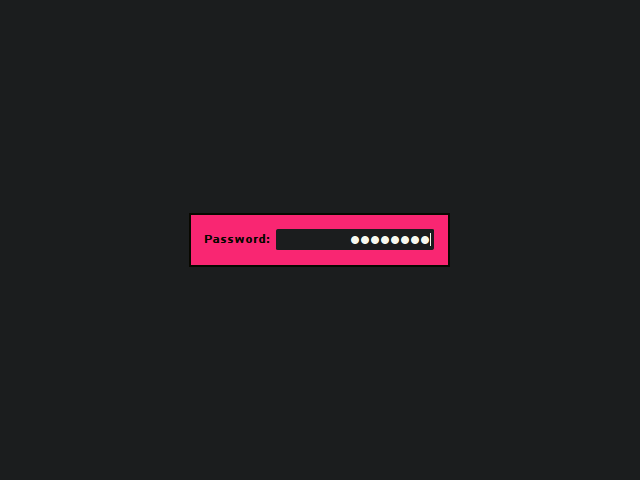 + + +## Install + +### Arch Linux + +Install the [lightdm-mini-greeter package][aur-package] from the Arch User +Repository: + +```sh +yay -S lightdm-mini-greeter +``` + +### Gentoo Linux + +Emerge the [lightdm-mini-greeter package][gentoo-package]: + +```sh +emerge x11-misc/lightdm-mini-greeter +``` + +### NixOS + +Enable & configure the greeter & default session in your `configuration.nix`: + +```nix +{ + services.xserver = { + enable = true; + displayManager.lightdm.greeters.mini = { + enable = true; + user = "your-username"; + extraConfig = '' + [greeter] + show-password-label = false + [greeter-theme] + background-image = "" + ''; + }; + # Optionally, set a default session + windowManager = { + default = "awesome"; + awesome.enable = true; + }; + }; +} +``` + +Then rebuild & switch your configuration with `nixos-rebuild switch`. + +### Debian + +Debian packages for the latest `stable` branch are available on the +[Releases][releases] page. + +You can use `debhelper` to build the package yourself: + +```sh +sudo apt-get install build-essential automake pkg-config fakeroot debhelper \ + liblightdm-gobject-dev libgtk-3-dev +cd lightdm-mini-greeter +fakeroot dh binary +sudo dpkg -i ../lightdm-mini-greeter_*.deb +``` + +Note: on Ubuntu, you need `liblightdm-gobject-1-dev` instead of +`liblightdm-gobject-dev`. + +### Manual + +You will need `automake`, `pkg-config`, `gtk+`, & `liblightdm-gobject` to build +the project. + +Grab the source, build the greeter, & install it manually: + +```sh +./autogen.sh +./configure --datadir /usr/share --bindir /usr/bin --sysconfdir /etc +make +sudo make install +``` + +Run `sudo make uninstall` to remove the greeter. + + +## Configure + +Once installed, you should specify `lightdm-mini-greeter` as your +`greeter-session` in `/etc/lightdm/lightdm.conf`. If you have multiple Desktop +Environments or Window Managers installed, you can specify the default +selection by changing the `user-session` option as well(look in +`/usr/share/xsessions` for possible values). + +Modify `/etc/lightdm/lightdm-mini-greeter.conf` to customize the greeter. At +the very least, you will need to set the `user`. All other settings are +optional & can be commented out or removed. + +You can test it out using LightDM's `test-mode`: + + lightdm --test-mode -d + +Or with `dm-tool`: + + dm-tool add-nested-seat + +Note: If you've added a `background-image` it will appear in this preview, but +it may not appear during normal use if the file is not in directory which +lightdm has permission to read(like `/etc/lightdm/`). A symlink into this +location won't work. + +### Keyboard layout + +If your keyboard layout is loaded from your shell configuration files (`.bashrc` +for example) then it might not be possible to type certain characters after +installing lightdm-mini-greeter. You should consider modifying your +[Xorg keyboard configuration](https://wiki.archlinux.org/index.php/Xorg/Keyboard_configuration#Using_X_configuration_files). + +For example for a french keyboard layout (azerty) you should edit/create +`/etc/X11/xorg.conf.d/00-keyboard.conf` with at least the following options: + +``` +Section "InputClass" + Identifier "system-keyboard" + MatchIsKeyboard "on" + Option "XkbModel" "pc104" + Option "XkbLayout" "fr" +EndSection +``` + +### Config file in $HOME + +You may wish to include your config file in their your home folder/dotfiles so +it is version controlled & easily transferable between systems. This is +possible, but on most systems, LightDM will not be able to read the +configuration file due to permission errors. + +The proper way to handle this is to loosen the permissions on your home +directory a bit. + +Start off by adding the `lightdm` user to your user's group: + + sudo usermod -aG $(whoami) lightdm + +Allow your user group to read your home directory: + + chmod g+rx ~ + +Move the mini-greeter config file: + + sudo mv /etc/lightdm/lightdm-mini-greeter.conf ~/.dotfiles/mini-greeter.conf + +And then add a symlink pointing to the file in your home directory: + + sudo ln -s ~/.dotfiles/mini-greeter.conf /etc/lightdm/lightdm-mini-greeter.conf + +And finally log out & restart LightDM: + + sudo systemctl restart lightdm + +If LightDM fails to start back up, check the greeter's log file(usually at +`/var/log/lightdm/seat0-greeter.log`) for the following line: + + Could not load configuration file: Permission denied + +If present, your permissions need further adjustment. You can test your +permissions by attempting to read the file with `sudo`: + + sudo -u lightdm cat ~/.dotfiles/mini-greeter.conf + + +## Contribute + +You can submit feature requests, bug reports, pull requests or patches on +either [github](http://github.com/prikhi/lightdm-mini-greeter) or +[redmine](http://bugs.sleepanarchy.com/projects/mini-greeter/). + +If you like Mini-Greeter, please consider packaging it for your distribution. + + +### Style + +* Use indentation and braces, 4 spaces - no tabs, no trailing whitespace. +* Declare pointers like this: `char *p1, *p2;`, avoid: `char* p1;`. +* Function braces should be on their own line. +* If/else/while/do should always use braces and indentation. +* Use `g_critical` for irrecoverable user errors, `g_error` for programming + errors. + +When in doubt, check surrounding code. + + +## License + +GPL-3 + + +[aur-package]: https://aur.archlinux.org/packages/lightdm-mini-greeter/ +[gentoo-package]: https://packages.gentoo.org/packages/x11-misc/lightdm-mini-greeter +[releases]: https://github.com/prikhi/lightdm-mini-greeter/releases |