-
1
-
2
-
3
-
4
-
5
-
6
-
7
-
8
-
9
-
10
-
11
-
12
-
13
-
14
-
15
-
16
-
17
-
18
-
19
-
20
-
21
-
22
-
23
-
24
-
25
-
26
-
27
-
28
-
29
-
30
-
31
-
32
-
33
-
34
-
35
-
36
-
37
-
38
-
39
-
40
-
41
-
42
-
43
-
44
-
45
-
46
-
47
-
48
-
49
-
50
-
51
-
52
-
53
-
54
-
55
-
56
-
57
-
58
-
59
-
60
-
61
-
62
-
63
-
64
-
65
-
66
-
67
-
68
-
69
-
70
-
71
-
72
-
73
-
74
-
75
-
76
-
77
-
78
-
79
-
80
-
81
-
82
-
83
-
84
-
85
-
86
-
87
-
88
-
89
-
90
-
91
-
92
-
93
-
94
-
95
-
96
-
97
-
98
-
99
-
100
-
101
-
102
-
103
-
104
-
105
-
106
-
107
-
108
-
109
-
110
-
111
-
112
-
113
-
114
-
115
-
116
-
117
-
118
-
119
-
120
-
121
-
122
-
123
-
124
-
125
-
126
-
127
-
128
-
129
-
130
-
131
-
132
-
133
-
134
-
135
-
136
-
137
-
138
-
139
-
140
-
141
-
142
-
143
-
144
-
145
-
146
-
147
-
148
-
149
-
150
-
151
-
152
-
153
-
154
-
155
-
156
-
157
-
158
-
159
-
160
-
161
-
162
-
163
-
164
-
165
-
166
-
167
-
168
-
169
-
170
-
171
-
172
-
173
-
174
-
175
-
176
-
177
-
178
-
179
-
180
-
181
-
182
-
183
-
184
-
185
-
186
-
187
-
188
-
189
-
190
-
191
-
192
-
193
-
194
-
195
-
196
-
197
-
198
-
199
-
200
-
201
-
202
-
203
-
204
-
205
-
206
-
207
-
208
-
209
-
210
-
211
-
212
-
213
-
214
-
215
-
216
-
217
-
218
-
219
-
220
-
221
-
222
-
223
-
224
-
225
-
226
-
227
-
228
-
229
-
230
-
231
-
232
-
233
-
234
-
235
# Mini-Greeter
[](https://aur.archlinux.org/packages/lightdm-mini-greeter) [](https://www.codacy.com/gh/prikhi/lightdm-mini-greeter/dashboard)
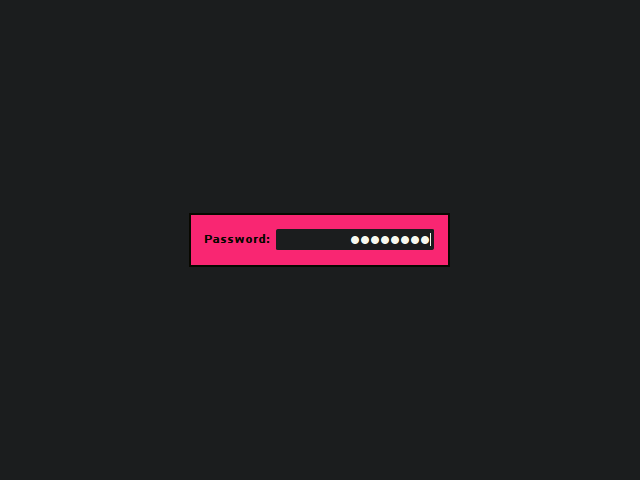
A minimal but highly configurable single-user GTK3 greeter for LightDM.
Inspired by the SLiM Display Manager & LightDM GTK3 Greeter.
## Goals
Eventually this is will present a more customizable interface:
* Randomized Background Wallpapers
* Configurable language/session info? (lightdm provides this already?)
* Handle GdkDisplay's `monitor-added` & `monitor-removed` signals
[Open Feature Requests](http://bugs.sleepanarchy.com/projects/mini-greeter/issues/)
## Current Status
Right now you can:
* log in
* hide the `Password:` label & customize the text
* hide the password input's cursor
* show the user, hostname, & current time
* set the password masking character
* set the size of the login window, the font, & every color
* set & scale a background image
* use modifiable hotkeys to cycle through sessions or trigger a shutdown,
restart, hibernate, or suspend
* reposition window on the x or y axis
## Install
### Arch Linux
Install the [lightdm-mini-greeter package][aur-package] from the Arch User
Repository:
```sh
yay -S lightdm-mini-greeter
```
### Gentoo Linux
Emerge the [lightdm-mini-greeter package][gentoo-package]:
```sh
emerge x11-misc/lightdm-mini-greeter
```
### NixOS
Enable & configure the greeter & default session in your `configuration.nix`:
```nix
{
services.xserver = {
enable = true;
displayManager.lightdm.greeters.mini = {
enable = true;
user = "your-username";
extraConfig = ''
[greeter]
show-password-label = false
[greeter-theme]
background-image = ""
'';
};
# Optionally, set a default session
windowManager = {
default = "awesome";
awesome.enable = true;
};
};
}
```
Then rebuild & switch your configuration with `nixos-rebuild switch`.
### Debian
Debian packages for the latest `stable` branch are available on the
[Releases][releases] page.
You can use `debhelper` to build the package yourself:
```sh
sudo apt-get install build-essential automake pkg-config fakeroot debhelper \
liblightdm-gobject-dev libgtk-3-dev
cd lightdm-mini-greeter
fakeroot dh binary
sudo dpkg -i ../lightdm-mini-greeter_*.deb
```
Note: on Ubuntu, you need `liblightdm-gobject-1-dev` instead of
`liblightdm-gobject-dev`.
### Manual
You will need `automake`, `pkg-config`, `gtk+`, & `liblightdm-gobject` to build
the project.
Grab the source, build the greeter, & install it manually:
```sh
./autogen.sh
./configure --datadir /usr/share --bindir /usr/bin --sysconfdir /etc
make
sudo make install
```
Run `sudo make uninstall` to remove the greeter.
## Configure
Once installed, you should specify `lightdm-mini-greeter` as your
`greeter-session` in `/etc/lightdm/lightdm.conf`. If you have multiple Desktop
Environments or Window Managers installed, you can specify the default
selection by changing the `user-session` option as well(look in
`/usr/share/xsessions` for possible values).
Modify `/etc/lightdm/lightdm-mini-greeter.conf` to customize the greeter. At
the very least, you will need to set the `user`. All other settings are
optional & can be commented out or removed.
You can test it out using LightDM's `test-mode`:
lightdm --test-mode -d
Or with `dm-tool`:
dm-tool add-nested-seat
Note: If you've added a `background-image` it will appear in this preview, but
it may not appear during normal use if the file is not in directory which
lightdm has permission to read(like `/etc/lightdm/`). A symlink into this
location won't work.
### Keyboard layout
If your keyboard layout is loaded from your shell configuration files (`.bashrc`
for example) then it might not be possible to type certain characters after
installing lightdm-mini-greeter. You should consider modifying your
[Xorg keyboard configuration](https://wiki.archlinux.org/index.php/Xorg/Keyboard_configuration#Using_X_configuration_files).
For example for a french keyboard layout (azerty) you should edit/create
`/etc/X11/xorg.conf.d/00-keyboard.conf` with at least the following options:
```
Section "InputClass"
Identifier "system-keyboard"
MatchIsKeyboard "on"
Option "XkbModel" "pc104"
Option "XkbLayout" "fr"
EndSection
```
### Config file in $HOME
You may wish to include your config file in their your home folder/dotfiles so
it is version controlled & easily transferable between systems. This is
possible, but on most systems, LightDM will not be able to read the
configuration file due to permission errors.
The proper way to handle this is to loosen the permissions on your home
directory a bit.
Start off by adding the `lightdm` user to your user's group:
sudo usermod -aG $(whoami) lightdm
Allow your user group to read your home directory:
chmod g+rx ~
Move the mini-greeter config file:
sudo mv /etc/lightdm/lightdm-mini-greeter.conf ~/.dotfiles/mini-greeter.conf
And then add a symlink pointing to the file in your home directory:
sudo ln -s ~/.dotfiles/mini-greeter.conf /etc/lightdm/lightdm-mini-greeter.conf
And finally log out & restart LightDM:
sudo systemctl restart lightdm
If LightDM fails to start back up, check the greeter's log file(usually at
`/var/log/lightdm/seat0-greeter.log`) for the following line:
Could not load configuration file: Permission denied
If present, your permissions need further adjustment. You can test your
permissions by attempting to read the file with `sudo`:
sudo -u lightdm cat ~/.dotfiles/mini-greeter.conf
## Contribute
You can submit feature requests, bug reports, pull requests or patches on
either [github](http://github.com/prikhi/lightdm-mini-greeter) or
[redmine](http://bugs.sleepanarchy.com/projects/mini-greeter/).
If you like Mini-Greeter, please consider packaging it for your distribution.
### Style
* Use indentation and braces, 4 spaces - no tabs, no trailing whitespace.
* Declare pointers like this: `char *p1, *p2;`, avoid: `char* p1;`.
* Function braces should be on their own line.
* If/else/while/do should always use braces and indentation.
* Use `g_critical` for irrecoverable user errors, `g_error` for programming
errors.
When in doubt, check surrounding code.
## License
GPL-3
[aur-package]: https://aur.archlinux.org/packages/lightdm-mini-greeter/
[gentoo-package]: https://packages.gentoo.org/packages/x11-misc/lightdm-mini-greeter
[releases]: https://github.com/prikhi/lightdm-mini-greeter/releases